Zoom Meetings

Zoom meeting are just modern seances.
The coldest winter I ever spent
Zoom meeting are just modern seances.
This is looking very good!
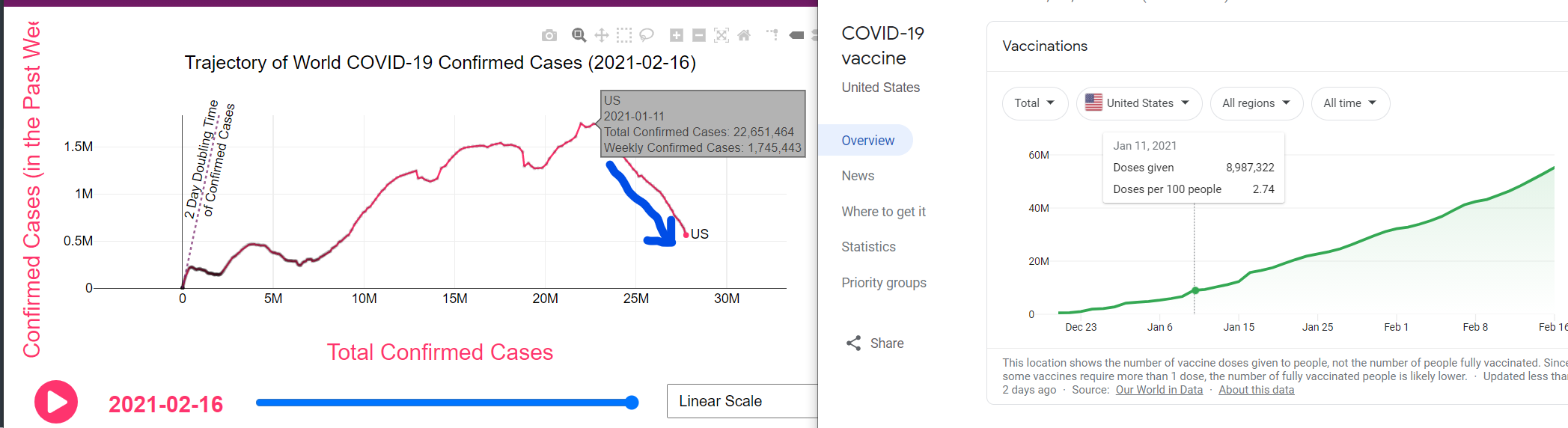
via CovidTrends and Google
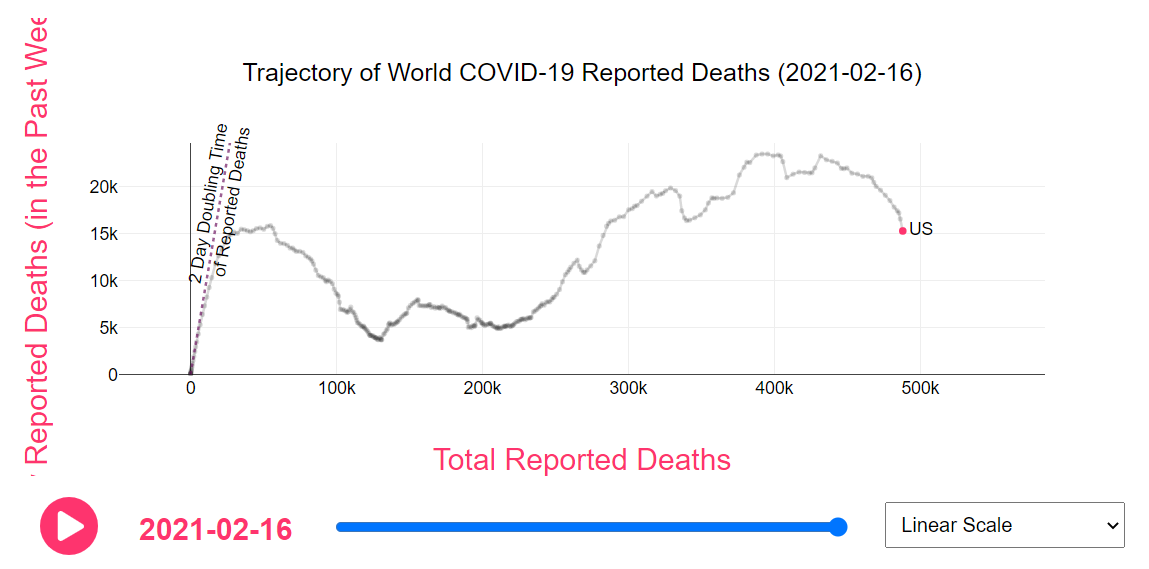
The US COVID death charts are following… probably.
Here’s one way to keep track of the books you’ve borrowed from the library. Many libraries in California do not let you view your checkout history, citing California law that mandates the confidentiality of borrowing records. I can understand that but I wish my local library let me choose.
My library, and thousands of others use a service called Library Elf. I see a few main benefits:
* view consolidated library accounts… ie. see if your daughter’s account has overdue books
* see a history of the books you’ve checked out
* get nice email reminders of almost-due books
I’ve been using it for about 2 months and it works pretty well. It’s free for me because my library subscribes to it. It might be free for you too.
I recently got some bluetooth earbuds for using on Zoom for Windows. Here’s a super tip
Bluetooth connects to computers 2 ways. “Headset AG” or “Headphone stereo”. AG is 2-way (the earbuds are headphones and a microphone) while regular is 1-way (the earbuds are just a headphone). The problem is that when you do it 2-way, the sound quality in both directions is much lower, telephone quality.
The tip: set ALL of your sound outputs on your computer to go to the “regular” bluetooth device and use the microphone on your laptop. Now you have great sounding wireless headphones. It can be tricky to figure out how to change all the outputs. Here are the key ones for me:
In Zoom:
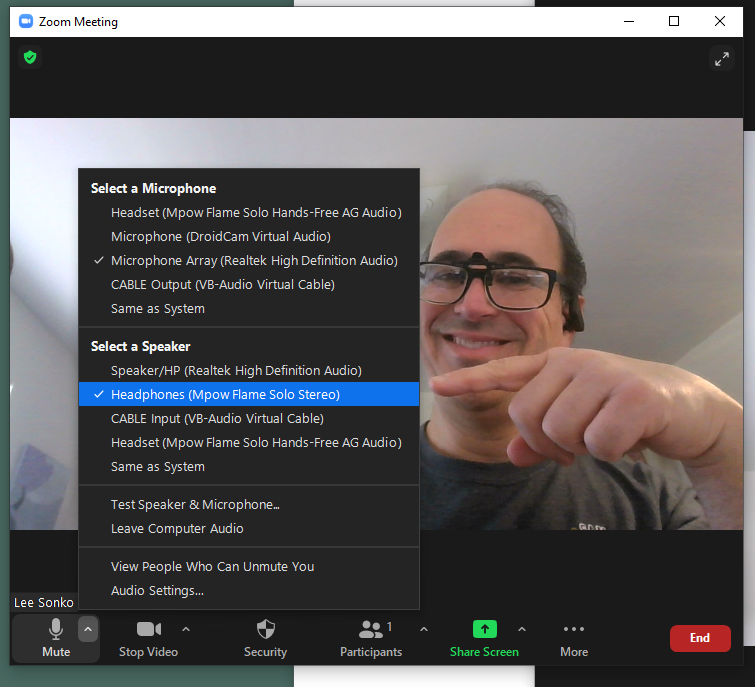
I selected the Speaker “Headphones (Mpow Flame Solo Stereo)” and not the “Headset (Mpow Flame Solo Hands-Free AG Audio)”. And the the microphone, I selected the one built into the computer “Microphone Array (Realtek High Definition Audio”.
In Windows, Click on the Speaker icon in the tray to get this menu and…
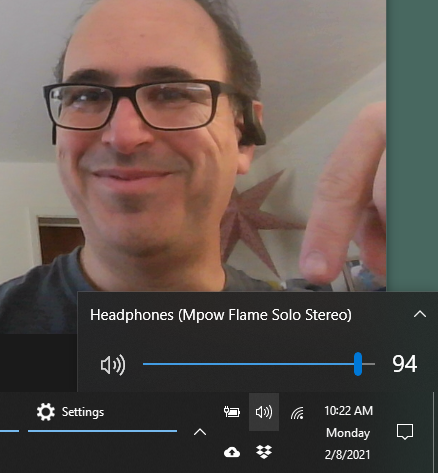
then click on the correct speaker like so:
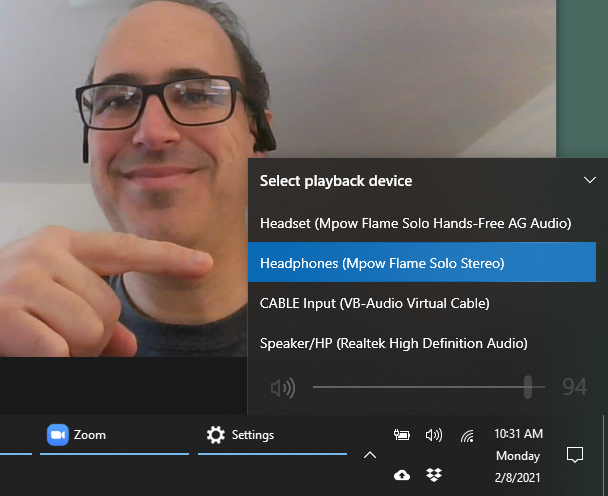
Now (hopefully!) all of your audio outputs will go to your earbuds in high quality. Enjoy the cordlessness!
I’m taking a 3 day Facebook and Imgur.com fast. Interrupting the Doomscrolling cycle will be good for my mental health.
(reminder to my future-self.. I keep scrolling, thinking I’m looking for the positive story that will give me hope and set me right. What I end up doing is building a catalog of negative stories that drive me further to look for the balancing positive ones. Hence, the doomscrolling cycle)
I place this here as a reality check to myself, suggesting how long this pandemic still has to go, and as a landmark for when some anti-vaxxer says something like “Nya nya, see? The infection rates fell on their own. I knew I didn’t need to get vaccinated!” To which I respond with this quote from covid19-projections.com on 2-3-21:
Summary
– We estimate COVID-19 herd immunity (>70% of population immune) will be reached in the US during summer 2021 (Jun-Aug 2021). At a high level, herd immunity is a concept in which a population can be protected from a virus if enough people possess immunity.– At the time herd immunity is reached, roughly half of the immunity will be achieved through natural infection, and the other half will be achieved through vaccination.
– New infections may become minimal before herd immunity is reached. But due to imported cases and localized clusters, it is unlikely that new infections will drop to zero until at least 2022.
– Deaths may drop to low levels even earlier (May-Jul 2021), in part due to a vaccine distribution strategy that initially prioritizes high-risk individuals. Once deaths fall to minimal levels, we may see a relaxation of restrictions.
– Summarizing the above findings, our best estimate of a complete “return to normal” in the US is mid-summer 2021 (June/July 2021).
– We estimate roughly 70-75% of the US population (230-250 million) will receive at least one dose of the vaccine by the end of 2021, with children being the last group to receive it (fall 2021).
– We estimate around 30-40% of the US population (~115 million) will have been infected by the SARS-CoV-2 virus by the end of 2021. That is an additional 50 million infections since mid-December 2020.
– This translates to a final US COVID-19 death toll of roughly 600,000 ( ±100,000) reported deaths, or ~300,000 additional deaths since mid-December 2020.
(Frank T. pointed me to this source, thanks Frank!)
“Follow the money.”
I have several times promoted the idea that the president’s political party has no influence on the US GDP or any other major economic indicator. I used as evidence some charts and discussion I’ve found online and eyeballing of Federal Reserve charts. I think I was wrong! I came across an article today that says my eyeballing skills are not as good as I believed! The research and newspaper article says, among other things:
Since 1933, the economy has grown at an annual average rate of 4.6 percent under Democratic presidents and 2.4 percent under Republicans, according to a Times analysis. In more concrete terms: The average income of Americans would be more than double its current level if the economy had somehow grown at the Democratic rate for all of the past nine decades.
I’m blown away at this analysis! I always hand-wavingly-guessed that Republicans had an edge when it came to sound fiscal policy. Republicans wear suits better (remember Alex Keaton on Family Ties?)… “greed is good”… all that! But this research turns the idea on its head!
The research paper uses some economics theory and math to say (warning, economics geekery. read the paper for more info):
…it appears that the Democratic edge stems mainly from more benign oil shocks, superior total factor productivity (TFP) performance, a more favorable international environment, and perhaps more optimistic consumer expectations about the near-term future.
The research was published in the peer reviewed American Economic Review in 2016.
– The research article, Presidents and the US Economy: An Econometric Exploration (local copy)
– The New York Times article: Opinion: Why Are Republican Presidents So Bad for the Economy?
I came across Jim Gill’s amazing finger play song One From The Left and got hooked. He’s got a huge catalog of catchy, fun kids songs. Check him out!
Such a lovingly crafted.. umm… acid trip tribute to Star Trek The Next Generation!
The love shows in the details.
(via JWZ)
From the top, pinned comment:
00:00 Taking the stuff with wife and friends
00:32 First signs of the effects, confusion
01:30 Mild pleasure, but also tension
02:33 Confusion intensifies, strengthened emotions, hallucinations begin
03:35 Hallucinations grow stronger and more intense
04:20 Glimpses from the other side
05:05 Confused emotional responses, nervous laughter
05:56 Trying to act normal despite the emerging chaos
06:33 The void opens, desperate attempts to avoid it
06:57 Mental regression, yelling for mother
07:38 All mental defences are ripped apart, intense flow of powerful emotions
08:23 Empathy and guidance from wife
08:59 Made it through to the other side, acceptance of death and decay
10:06 Getting used to the new state of existence, feelings of relief and joy
10:55 Chaos subsides, feelings of tranquility, peace
11:59 Bodily functions interrupt the harmony, mental noise emerges
12:36 Pushing bodily feelings and ensuing random irritating thoughts aside
12:49 Empty reasoning arises and is understood to be false
14:31 Urge to defecate simply won’t go away
14:45 Taking a dump, wondering the simple wonders of modern toilets
15:12 Facing the horrendous sight and smell of excrement
15:28 Empty reasoning re-emerges as a defence and is flushed away with the shit
15:45 Realization of corporeal existence
16:06 Creativity emerges, attempting to overcome corporeality
16:30 Mental noise disturbs the creative process
16:57 Realization of the contradictory and imperfect nature of the human life
17:47 Regaining some control of thoughts and emotions
18:39 Attempting to regain control of the mind
18:53 Defensive reasoning re-emerges as psychotic delusions
19:31 Reasoning is once again blasted away
19:41 Uncertain feelings of triumph
19:53 Slowly learning to feel pleasure and joy again
20:39 Bodily functions once again interrupt, but there’s no threat of excrement
20:49 Focusing on the more pleasurable sides of existence
21:36 Melancholy tranquility, peace
22:43 Sudden horror and confusion
23:15 Finding strenght, fighting back
23:32 Integrating the horrors
23:47 Relaxing despite the emergence of worst fears, dancing with the boogie-man
24:36 Serenity, reaching the peak
25:06 Realizing that energy drinks are from the Devil
25:30 True creativity emerges, riding the stream of pure Love
26:31 The peak is over, memories of mortal existence start to emerge
27:16 Trying in vain to return to the angelic state
27:54 Fatigue ensues
28:06 Bowel movements wake the body up and rush it back to the toilet
28:18 Only a fart, no excrement in pants – feeling the relief
28:25 The toilet still gives rise to feelings of wonder
28:41 Sudden rush of painful memories, intense feelings of shame, sadness and hate
29:01 Fighting back so hard that the trip seems to vanish
29:04 Thinking back, slight feelings of suspicion
30:00 Realizing that it’s not over yet
30:06 The trip returns with a strong and uneasy flow of emotions
30:34 The flow suddenly ends and an uncertain bodily feeling arises
30:55 Foul bodily smells once again give rise to the fear of excrement
31:06 The situation seems serious this time but once again it’s only a fart
31:29 The trip seems to be subsiding and it is time to wonder out to the nature
32:50 Identifying with all the miraculous little critters
34:03 Marvelling the beauty of nature, rediscovering love
34:20 Feeling young again, making out with wife
34:41 Back home again, enjoying the pleasures of modern electronics
35:45 Bodily functions start to feel more natural, but still unpleasant
36:40 Reason re-emerges, this time to help integrate the fading experience
38:33 Soul is pulled back from the astral plane
39:03 The trip is over, intense feelings of relief and joy
40:51 Avoiding difficult thoughts through self-deception has become more difficult