This story is from a while ago but I’m just getting around to putting it in my journal.
The weirdest thing happened to me when I was installing XP on my home machine. The install CD had just copied all it’s files to my computer and it was getting ready to boot itself into XP for the first time. When it shuts down for the reboot, my UPS started beeping as if the power had gone out and it was running on battery! Well, I hadn’t touched the computer… I wasn’t even sitting at the desk when it happened. I climbed underneath and verified that all the wires were ok…. I unplugged and replugged the UPS… all the while, XP is starting up for the first time on the computer.
There was nothing I could do! The UPS believed itself to be unplugged! I’ve got about 20 minutes of power on the batteries so I took the very first opportunity to power off the computer and then power cycle the UPS. The UPS was fine after that. Totally weird.
Now consider what happened…. The UPS was connected to the computer only by a power cord… no serial cord… no USB. So how did the UPS know that XP was coming? Did XP do something horrible to the power supply? No, that’s impossible, isn’t it? Bear in mind that this has never happened in the 6 years I’ve owned the UPS and hasn’t happened since. And that it happened at the exact moment I was switching over from 2000 to XP.
Weird.
I subbed today.
I was a bad boy.
I flooded the boys room!
Yeah!
The real story isn’t nearly so anti-establishment… I was subbing at the Hackettstown Middle School (my first time this year). I went into the boys bathroom and saw that one of the toilets had some “material” in the bottom of the bowl. It looked like it had been flushed once but didn’t go all the way down. So I flushed it again. I noticed that it wasn’t going down. I saw the bowl filling up pretty quick and frowned. I think it’s totally weird how when a toilet bowl is just about to overfill, it gets closer and closer to the rim and then pauses…. like it’s deciding whether to ruin your day or not. Sometimes it proceeds, and sometimes it hovers there, just threatening you. Well, in this case, it proceeded like Niagara Falls. Woosh! The little flood took over half of the bathroom before finding its way to the urinal drains 15 feet away. This thing was cranking out like 10 gallons a minute. I banged on the mechanism and fiddled with it to try and make it stop but my efforts did nothing but get my shoes wet.
I ran into the hallway with my wet shoes, ran across the hall into a classroom and fessed up to a teacher. She told me to call the custodian on the phone. He was up in a minute to turn off the water.
I flooded the boys room.
lifted from http://www.petri.co.il/change_office_xp_cdkey.htm
You can do it by editing the Registry. Apply this procedure:
- Locate your valid product CD Key, which is located on the back of the original CD case.
- On the Start menu, click Run.
- In the Open box, type regedit, and then click OK.
- In Registry Editor, find the following subkey:
HKLM\SOFTWARE\Microsoft\Office\10.0\Registration
Click the plus sign (+) next to this folder. If you see only one subkey in this folder that has a 32-character {GUID} (globally unique identifier), select that subkey and go to step 5.
If you see more than one subkey that has a 32-character {GUID}, select each one until you find the one whose DisplayName value (in the right pane) matches your version of Office.
- For the selected {GUID} subkey, select the ProductID string value in the right pane.
- On the Edit menu, click Rename.
- Type
OldProductID
and then press ENTER.
- On the Registry menu, click Exit.
Reader note: Reader Mike Fairburn wrote:
“Great work and a great service to the Internet community. I looked at your page and tried the fix you suggest. I have, however, discovered that you need to do more than what you suggest. What you need to do is delete the digital ID above the Product ID. This forces the next Office XP app to open to request a valid key.”
Thanks. You guys should check his advice and see if it’s indeed required.
- Start any Office program.
- When the Microsoft Office XP User Information dialog box appears, type your valid product CD Key (located on the back of the CD case). Follow the instructions on your screen.
Reader note: Greg Guerrero from the USA wrote:
“If you open MS Word and it does not ask you for a CD Key, go to step 11.”
Return to step 4, select the Registration folder.
- Right click Registration folder and select rename.
- Type OldRegistration and press enter.
- Follow steps 8 – 10.
Reader note: Crazy Dave from the USA wrote:
“In regards to your article “How can I change the CD Key of my Office XP installation?” a final step in some cases (as it was in mine) is to go to the HELP menue in the MSoXP application that you open, and select the “about…” option.”
Thanks.
I wrote this to Spamnet today. I still think their service is excellent. It could just be a little better.
I get about 3 false positives per week, mostly from mass mailers from companies I want to receive mail from (IE. Coldwater Creek, Pogo.com, Avantgo, NikonNet). I suspect that these false positives come from other Spamnet members that want to cancel their subscription to these mailers but not wanting to bother with unsubscribing.
Please make it more clear to Spamnet users that the “Block” button should only be used for spam and not to unsubscribe from legitimate mailers. Your tutorials don’t express this clearly enough.
Thank you,
Lee Sonko
Someone asked me for my Versacounter sourcecode. (See Journal 10-23-03). Here are my notes from vcounter.pl:
# VersaCounter (version 1.0a) 12-1-03
# Version 1.0 by Michael Chavel. Version 1.0a modifications by Lee Sonko
# 1.0a is a simple port that uses .png files instead of .gif files.
# Recent versions (after 2001?) of the Perl GD module don’t support .gif files
# due to patent issues with Unisys. 1.0a gets around that issue by swapping .gifs
# for .png files.
And here is the new (version 1.0a) code.
In case you don’t have it, here is the original (version 1.0) Vesacounter code from Chavel’s website.
I think Versacounter is a terrific website counter program. I like it primarily because it doesn’t need server side includes, it’s customizable on a per-counter basis, it’s a snap to make new counters, and the code on the web page is very easy to read. Here’s an example from this Journal page:
<img src="http://lee.org/scgi-bin/vcounter.pl?&page=journal_index_hits&block=1" alt="[hit meter]">

hits from <a href="http://lee.org/counter.html"></a>

<img src="http://lee.org/scgi-bin/vcounter.pl?&page=journal_index_visits&block=14400"

alt="[visit meter]"> visits to my journal homepage since October 23rd, 2003.

<a href="http://lee.org/counter.html"><a>
That code makes 2 graphical counters, reading “nnn hits from nnn visits to my journal homepage…” I count ‘visits’ as a bunch of requests from the same IP address in 14,400 seconds…. 4 hours. Simple.
I’ve been using Spenix.com for my ISP for several weeks now and I’m very happy with them. Their tech support is very good, price is excellent, up-time is very good, services are just great (I got my SSH command prompt :-) )
or
You know that there are unresolved issues in your life when…
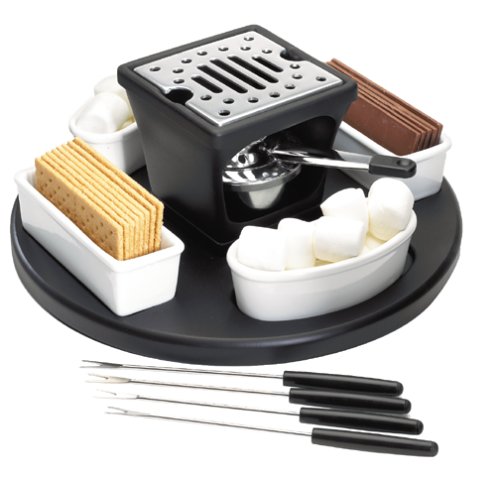
You buy one of these:
I was down a gallon of antifreeze. The coolant system likely had a vaporlock condition. Still… where did that gallon of antifreeze go?!? Especially since I had an oil change at the dealer just a month ago. They are supposed to check for that kind of stuff.
I’ve had my 1998 Chrysler Sebring for 5 years, 1 1/2 months. I know this partially because I got the car on my birthday. The other reason is that I purchased a 5 year extended warranty on the car for about $1,400. Nothing ever went bad on the car in all that time. . . . . . until tonight, 1 1/2 months after the warranty and service plan expires.
I swear, they have a little timer in them. That’s why you can’t buy the extended warrantee after the car leaves the showroom; they have to set the timer before you get it.
I was driving along and noticed that all of a sudden the heat wasn’t heating. I looked down and noticed that the temperature gauge was high and rising so I pulled over at a rest stop. After waiting 30 minutes and walking to the Delaware river to fill my water bottle for the radiator, I got back in the car and took off. I made it just 1 mile before it was topping the red zone again. I realized I wasn’t going to limp home. I pulled off at Rt 80 Exit 4 (20 miles from home) into a truck stop, called a friend to pick me up (thanks Jack), called a nearby mechanic and waited to be picked up at McDonald’s.
If I learned one thing from this whole experience it’s that I don’t much like McDonald’s any more. Too filling, fatty and flavorless. Two hours later, I still feel bloated even though I didn’t finish my fries or shake.
Let’s hope I get out of this without too much expenditure…
This is part of a letter I wrote to an acquaintance a few months ago
>As for my MST3K stuff, what shows are you missing from your collection?
I never tried collecting MST3K shows. But there is always one sitting on Tivo ready for me to spend two hours on! I went kooky taping Babylon 5 and that was enough for me. So now I’ve got some 116 hours or so of B5 on SVHS and I don’t know what to do with it. It was that experience that convinced me just a few years ago that I should watch/experience/read stuff and then let them go. I used to keep most everything I thought was important. But then I just sold or gave most of it away… and surprise, I didn’t explode or wither away! Of course, I still seem to have too much “stuff”, it’s ongoing… but at least it’s now eminently manageable.