Swipe-back in Obsidian.md
On my Mac, I just figured out how to make it so you can swipe-back to a previous page, or swipe-forward to the next page using the trackpad. Here’s how:
On your Mac, go to System Settings | Trackpad | More Gestures.
Set “Swipe between pages” to “Swipe with Three Fingers” (no, “Swipe with Two or Three Fingers” doesn’t work. Nor does “Scroll Left or Right with Two Fingers”)
By setting this, you may have broken some other trackpad gestures on the same page. Fix ’em and move on and now you’ll be able to swipe-back and swipe-forward in Obsidian, as well as other apps (I’ve only tested Chrome so far)!
For me, now I’ll have to use 3 fingers instead of 2, and it reverses the motion of what I am used to for swipe-right and swipe-left. And now I have to do a 4-finger swipe instead of a 3-finger swipe to slide my virtual windows. I certainly hope I’ll be able to get used to these changes!
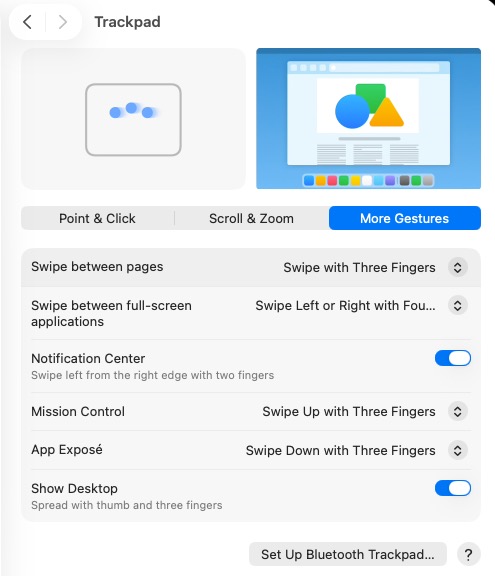
Screenshot